

Intro
Modern applications face a relentless, evolving threat landscape. Even with AWS WAF guarding your perimeter, your telemetry—WAF logs, application metrics, access logs, CloudTrail events, third‑party signals—quickly becomes a flood. Teams are often stuck in reactive mode: detecting anomalies too late, struggling to find root causes across fragmented systems, and losing precious time before meaningful action is taken.
Generative AI flips that script. By combining AWS WAF, Amazon CloudWatch, and Amazon Bedrock Agents (often referred to as the agent runtime/core), we can transform raw telemetry into actionable insights. In this article, we’ll build a simple web application protected by WAF, stream its metrics and logs to CloudWatch and S3, and feed the signals into Bedrock to:
- Detect anomalies (e.g., spikes in 403s, bot behavior, SQLi patterns)
- Diagnose likely causes using multi‑source context (WAF logs, app metrics, CloudTrail, and external log feeds)
- Decide and act: trigger alerts, open tickets, or automatically mitigate (e.g., update WAF rules, throttle endpoints, invoke Lambda runbooks)
Yes, CloudWatch already provides Generative AI observability for Bedrock workloads—exposing standardized metrics, traces, and logs for model and agent behavior. But walking through a manual, end‑to‑end setup gives you invaluable understanding and control. You’ll learn how to build custom actions, enrich AI context with additional data sources (inside and outside AWS), and design safe automation that’s portable to your custom hybrid and on‑prem environments.
By the end, you’ll have a repeatable pattern that:
- Strengthens your security posture with faster detection and response
- Reduces mean time to diagnose (MTTD) and mean time to resolve (MTTR)
- Monitors the AI itself—token usage, latency, errors, guardrail evaluations—using CloudWatch’s GenAI observability
- Safely automates mitigations with guardrails, RBAC, and auditable workflows
Ready? Let’s build this, step by step
If you are new to Bedrock, I suggest reading my previous post: “From Zero to Amazon Bedrock”
The Concept
We’ll use AWS services with Bedrock as the decision engine. The system will:
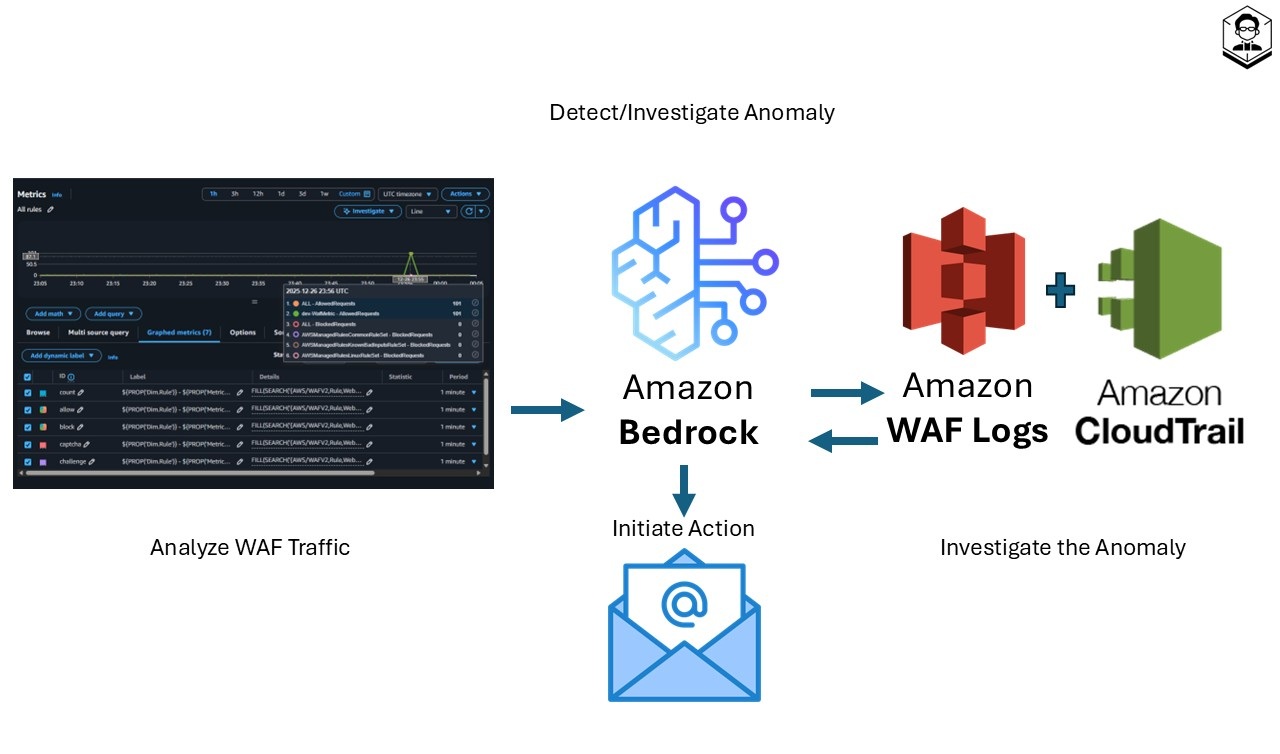
• Monitor: Collect WAF traffic, metrics, and logs on a schedule.
• Detect: Prompt Bedrock to flag anomalies.
• Investigate: Pull WAF logs for details and CloudTrail for changes.
• Act: If confident, take action—like emailing admins.
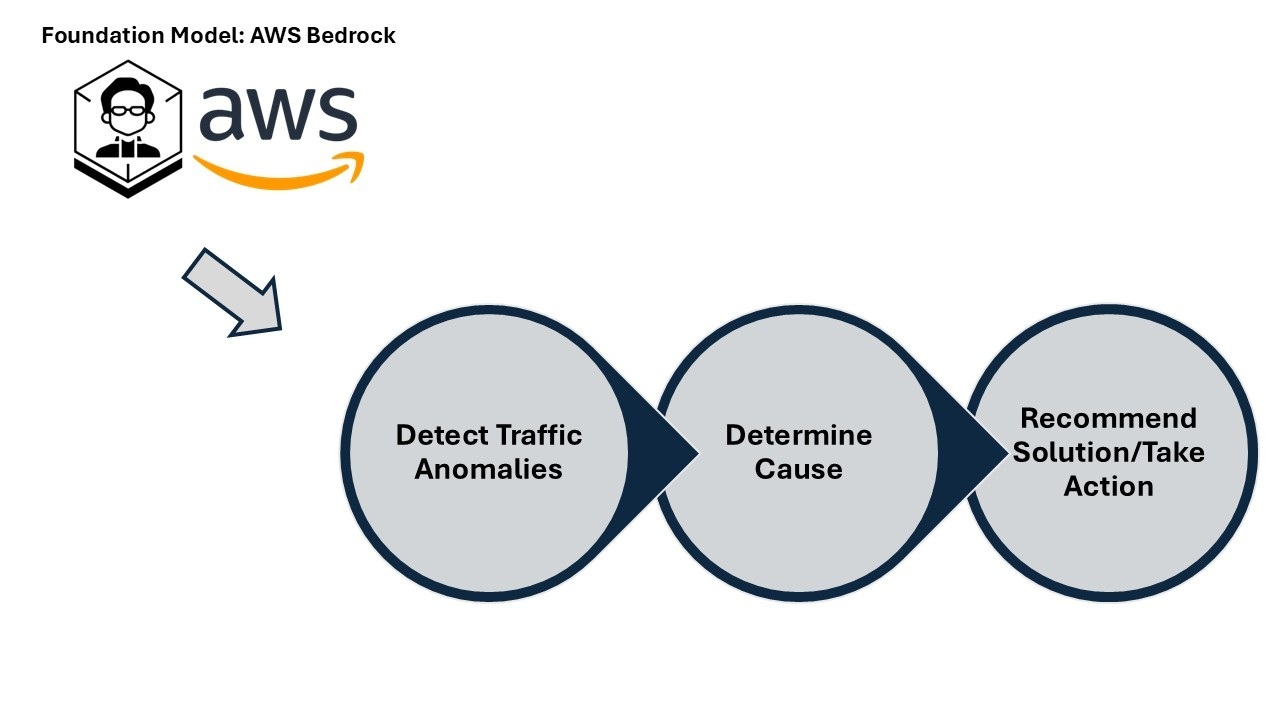
From metrics to action
• Analyze metrics: On a fixed schedule, the system reviews AWS WAF CloudWatch metrics to spot unusual patterns.
• Detect anomalies: Signals are sent to Amazon Bedrock, where tailored prompts guide LLM-based anomaly detection.
• Investigate: For flagged events, the system inspects AWS WAF logs (request details) and AWS CloudTrail logs (recent config/permission changes) to determine root cause.
• Take action: Using a confidence score, the system decides next steps—currently, it emails the admin with a detailed summary of the detection and investigation results.
Remember, this is a starter template—meant to spark your creativity. There are thousands of ways to improve and adapt it once you grasp the power of AWS AI services.
This is a playground setup, not meant for production.
The High Level Architectural Diagram
Understanding the architecture
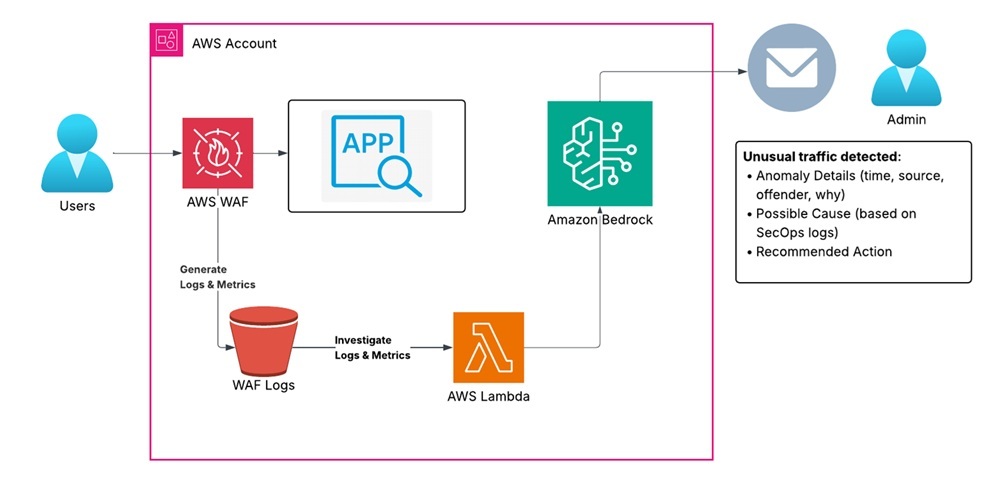
Our application runs in an AWS account with AWS WAF positioned in front to protect it from malicious traffic. AWS WAF publishes traffic metrics to Amazon CloudWatch and produces detailed request logs stored in Amazon S3 (commonly via Amazon Kinesis Data Firehose). Scheduled AWS Lambda functions (triggered by Amazon EventBridge) aggregate these signals and invoke Amazon Bedrock—using tailored prompts—to analyze patterns, detect anomalies, and surface potential threats or misconfigurations. When unusual traffic is detected, the workflow investigates using AWS WAF logs and correlates recent changes from AWS CloudTrail, then emails the application administrator with a summary of the detection and investigation
The App - Architectural Diagram
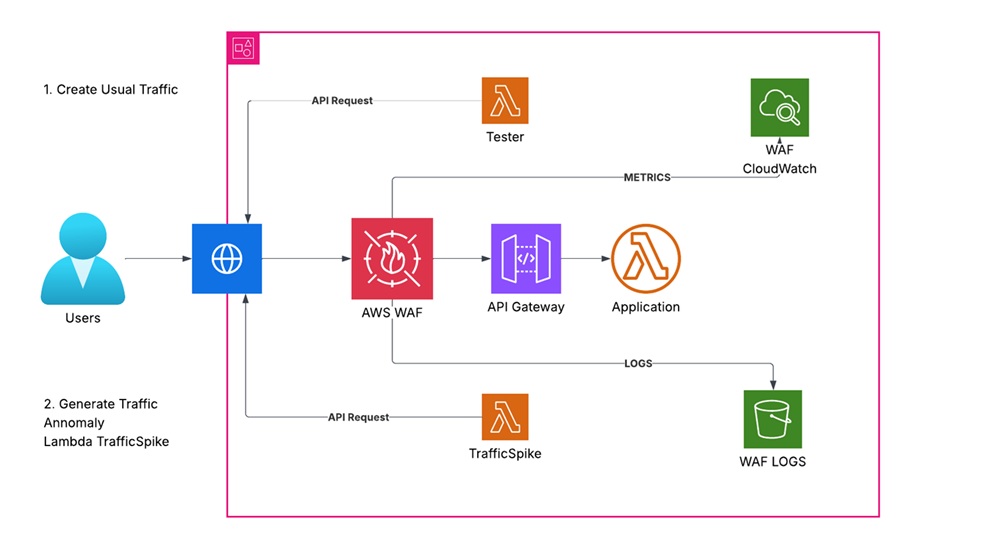
Component breakdown:
Compute:
• AWS Lambda (App function) — simple handler responding to API requests.
• API front door: Amazon API Gateway (REST API) — exposes the Lambda via a public endpoint (API key required via Usage Plan).
Protection:
• AWS WAF (REGIONAL Web ACL) — associated with the API Gateway stage to filter malicious traffic using managed rules.
Observability:
• CloudWatch Logs — Lambda function logs and API Gateway access logs.
• CloudWatch Metrics — Lambda invocations, duration, errors; API Gateway metrics; WAF metrics.
• WAF Logs — delivered via Amazon Kinesis Data Firehose to Amazon S3 for downstream analysis.
Traffic generators:
• Lambda-Tester — generates baseline, benign requests to the API endpoint.
• Lambda-TrafficSpike — simulates bursty or anomalous patterns to test detection.
TIP: Costs and cleanup
Running traffic generators and storing logs may incur charges (API Gateway, Lambda, Firehose, S3, CloudWatch).
To clean up, delete the CloudFormation stack; confirm the S3 bucket is empty or set DeletionPolicy/Retain as appropriate. Consider a lifecycle policy for the WAF logs bucket.
You can deploy the app using the CloudFormation template below, or challenge yourself to build it manually.
If you roll your own, make sure to:
• Associate the WAF Web ACL with the API Gateway stage (REGIONAL).
• Deliver WAF logs to Amazon S3 via Amazon Kinesis Data Firehose.
• Enable API Gateway access logs and Lambda logs in CloudWatch.
• Require an API key via a Usage Plan for calls to the REST API.
• Schedule the TesterLambda with Amazon EventBridge (e.g., rate(5 minutes)).
TIP: How to use this template
• Save the CloudFormation YAML as a file (e.g., app-stack.yaml).
• In your AWS account: CloudFormation → Create stack → With new resources (standard).
• Select “Upload a template file,” then choose your file, set parameters, and create the stack.
CloudFormation Template - The App
AWSTemplateFormatVersion: '2010-09-09'
Description: >
  Test CloudFormation Template for a Lambda-based test app.
  The app is accessible only via two test Lambdas (Tester and TrafficSpike)
  using an API key.
  WAF protection is enabled with managed rule groups.

Parameters:
  EnvironmentName:
    Type: String
    Default: "dev"
    Description: "Environment name (e.g., dev, prod)"

Resources:

  ##########################################################
  # IAM Role and Policy for AppLambda
  ##########################################################
  AppLambdaRole:
    Type: AWS::IAM::Role
    Properties:
      RoleName: !Sub "${EnvironmentName}-AppLambdaRole"
      AssumeRolePolicyDocument:
        Version: "2012-10-17"
        Statement:
          - Effect: Allow
            Principal:
              Service:
                - lambda.amazonaws.com
            Action:
              - sts:AssumeRole
      ManagedPolicyArns:
        - arn:aws:iam::aws:policy/service-role/AWSLambdaBasicExecutionRole

  ##########################################################
  # AppLambda Function
  ##########################################################
  AppLambda:
    Type: AWS::Lambda::Function
    DependsOn: [AppLambdaRole]
    Properties:
      FunctionName: !Sub "${EnvironmentName}-AppLambda"
      Handler: index.lambda_handler
      Runtime: python3.12
      Role: !GetAtt AppLambdaRole.Arn
      Code:
        ZipFile: |
          import json
          def lambda_handler(event, context):
              return {
                  "statusCode": 200,
                  "body": json.dumps({"message": "Hello from the App Lambda!"})
              }
      Environment:
        Variables:
          ENV: !Ref EnvironmentName

  ##########################################################
  # IAM Role for TesterLambda
  ##########################################################
  TesterLambdaRole:
    Type: AWS::IAM::Role
    Properties:
      RoleName: !Sub "${EnvironmentName}-TesterLambdaRole"
      AssumeRolePolicyDocument:
        Version: "2012-10-17"
        Statement:
          - Effect: Allow
            Principal:
              Service:
                - lambda.amazonaws.com
            Action:
              - sts:AssumeRole
      ManagedPolicyArns:
        - arn:aws:iam::aws:policy/service-role/AWSLambdaBasicExecutionRole
        - arn:aws:iam::aws:policy/AWSXrayWriteOnlyAccess

  ##########################################################
  # TesterLambda Function (scheduled every 5 minutes)
  ##########################################################
  TesterLambda:
    Type: AWS::Lambda::Function
    DependsOn: [TesterLambdaRole]
    Properties:
      FunctionName: !Sub "${EnvironmentName}-TesterLambda"
      Handler: tester.lambda_handler
      Runtime: python3.12
      Role: !GetAtt TesterLambdaRole.Arn
      Code:
        ZipFile: |
          import os
          import urllib.request
          def lambda_handler(event, context):
              api_endpoint = os.environ.get("API_ENDPOINT")
              api_key = os.environ.get("API_KEY")
              req = urllib.request.Request(api_endpoint)
              req.add_header("x-api-key", api_key)
              try:
                  with urllib.request.urlopen(req) as response:
                      body = response.read().decode("utf-8")
                      print("Response from AppLambda:", body)
              except Exception as e:
                  print("Error invoking API:", e)
              return {"status": "success"}
      Environment:
        Variables:
          API_ENDPOINT: !Sub "https://${ApiGatewayRestApi}.execute-api.${AWS::Region}.amazonaws.com/prod/app"
          API_KEY: !Ref AppApiKey

  ##########################################################
  # IAM Role for TrafficSpikeLambda
  ##########################################################
  TrafficSpikeLambdaRole:
    Type: AWS::IAM::Role
    Properties:
      RoleName: !Sub "${EnvironmentName}-TrafficSpikeLambdaRole"
      AssumeRolePolicyDocument:
        Version: "2012-10-17"
        Statement:
          - Effect: Allow
            Principal:
              Service:
                - lambda.amazonaws.com
            Action:
              - sts:AssumeRole
      ManagedPolicyArns:
        - arn:aws:iam::aws:policy/service-role/AWSLambdaBasicExecutionRole

  ##########################################################
  # TrafficSpikeLambda Function (simulate traffic spike)
  ##########################################################
  TrafficSpikeLambda:
    Type: AWS::Lambda::Function
    DependsOn: [TrafficSpikeLambdaRole]
    Properties:
      FunctionName: !Sub "${EnvironmentName}-TrafficSpikeLambda"
      Handler: spike.lambda_handler
      Runtime: python3.12
      Role: !GetAtt TrafficSpikeLambdaRole.Arn
      Code:
        ZipFile: |
          import os
          import urllib.request
          def lambda_handler(event, context):
              api_endpoint = os.environ.get("API_ENDPOINT")
              api_key = os.environ.get("API_KEY")
              for i in range(10):
                  req = urllib.request.Request(api_endpoint)
                  req.add_header("x-api-key", api_key)
                  try:
                      with urllib.request.urlopen(req) as response:
                          body = response.read().decode("utf-8")
                          print(f"Call {i+1}: {body}")
                  except Exception as e:
                      print(f"Error on call {i+1}:", e)
              return {"status": "spike generated"}
      Environment:
        Variables:
          API_ENDPOINT: !Sub "https://${ApiGatewayRestApi}.execute-api.${AWS::Region}.amazonaws.com/prod/app"
          API_KEY: !Ref AppApiKey

  ##########################################################
  # API Gateway REST API (fronting AppLambda)
  ##########################################################
  ApiGatewayRestApi:
    Type: AWS::ApiGateway::RestApi
    Properties:
      Name: !Sub "${EnvironmentName}-AppApi"

  ##########################################################
  # API Resource: creates /app path
  ##########################################################
  ApiResource:
    Type: AWS::ApiGateway::Resource
    DependsOn: [ApiGatewayRestApi]
    Properties:
      ParentId: !GetAtt ApiGatewayRestApi.RootResourceId
      RestApiId: !Ref ApiGatewayRestApi
      PathPart: app

  ##########################################################
  # API Method: GET on /app using Lambda Proxy integration
  ##########################################################
  ApiMethod:
    Type: AWS::ApiGateway::Method
    DependsOn: [ApiResource, AppLambda]
    Properties:
      RestApiId: !Ref ApiGatewayRestApi
      ResourceId: !Ref ApiResource
      HttpMethod: GET
      AuthorizationType: NONE
      ApiKeyRequired: true
      Integration:
        Type: AWS_PROXY
        IntegrationHttpMethod: POST
        Uri:
          Fn::Join:
            - ""
            - - "arn:aws:apigateway:"
              - !Ref "AWS::Region"
              - ":lambda:path/2015-03-31/functions/"
              - !GetAtt AppLambda.Arn
              - "/invocations"

  ##########################################################
  # API Deployment (without StageName)
  ##########################################################
  ApiDeployment:
    Type: AWS::ApiGateway::Deployment
    DependsOn: [ApiMethod]
    Properties:
      RestApiId: !Ref ApiGatewayRestApi

  ##########################################################
  # API Stage: explicitly create "prod" stage
  ##########################################################
  ApiStage:
    Type: AWS::ApiGateway::Stage
    DependsOn: [ApiDeployment]
    Properties:
      StageName: prod
      DeploymentId: !Ref ApiDeployment
      RestApiId: !Ref ApiGatewayRestApi

  ##########################################################
  # API Key and Usage Plan
  ##########################################################
  AppApiKey:
    Type: AWS::ApiGateway::ApiKey
    DependsOn: [ApiStage]
    Properties:
      Name: !Sub "${EnvironmentName}-AppApiKey"
      Enabled: true

  ApiUsagePlan:
    Type: AWS::ApiGateway::UsagePlan
    DependsOn: [ApiStage]
    Properties:
      UsagePlanName: !Sub "${EnvironmentName}-UsagePlan"
      ApiStages:
        - ApiId: !Ref ApiGatewayRestApi
          Stage: prod

  UsagePlanKey:
    Type: AWS::ApiGateway::UsagePlanKey
    DependsOn: [ApiUsagePlan, AppApiKey]
    Properties:
      KeyId: !Ref AppApiKey
      KeyType: API_KEY
      UsagePlanId: !Ref ApiUsagePlan

  ##########################################################
  # Allow API Gateway to invoke AppLambda
  ##########################################################
  LambdaPermissionForApiGateway:
    Type: AWS::Lambda::Permission
    DependsOn: [AppLambda]
    Properties:
      FunctionName: !Ref AppLambda
      Action: lambda:InvokeFunction
      Principal: apigateway.amazonaws.com
      SourceArn: !Sub "arn:aws:execute-api:${AWS::Region}:${AWS::AccountId}:${ApiGatewayRestApi}/*/GET/app"

  ##########################################################
  # WAFv2 Web ACL for API Gateway protection with Managed Rule Groups
  ##########################################################
  WafWebACL:
    Type: AWS::WAFv2::WebACL
    Properties:
      Name: !Sub "${EnvironmentName}-WafWebACL"
      Scope: REGIONAL
      DefaultAction:
        Allow: {}
      VisibilityConfig:
        CloudWatchMetricsEnabled: true
        MetricName: !Sub "${EnvironmentName}-WafMetric"
        SampledRequestsEnabled: true
      Rules:
        - Name: AWSManagedRulesCommonRuleSet
          Priority: 1
          Statement:
            ManagedRuleGroupStatement:
              VendorName: AWS
              Name: AWSManagedRulesCommonRuleSet
          OverrideAction:
            None: {}
          VisibilityConfig:
            SampledRequestsEnabled: true
            CloudWatchMetricsEnabled: true
            MetricName: AWSManagedRulesCommonRuleSet
        - Name: AWSManagedRulesAdminProtectionRuleSet
          Priority: 2
          Statement:
            ManagedRuleGroupStatement:
              VendorName: AWS
              Name: AWSManagedRulesAdminProtectionRuleSet
          OverrideAction:
            None: {}
          VisibilityConfig:
            SampledRequestsEnabled: true
            CloudWatchMetricsEnabled: true
            MetricName: AWSManagedRulesAdminProtectionRuleSet
        - Name: AWSManagedRulesKnownBadInputsRuleSet
          Priority: 3
          Statement:
            ManagedRuleGroupStatement:
              VendorName: AWS
              Name: AWSManagedRulesKnownBadInputsRuleSet
          OverrideAction:
            None: {}
          VisibilityConfig:
            SampledRequestsEnabled: true
            CloudWatchMetricsEnabled: true
            MetricName: AWSManagedRulesKnownBadInputsRuleSet
        - Name: AWSManagedRulesLinuxRuleSet
          Priority: 4
          Statement:
            ManagedRuleGroupStatement:
              VendorName: AWS
              Name: AWSManagedRulesLinuxRuleSet
          OverrideAction:
            None: {}
          VisibilityConfig:
            SampledRequestsEnabled: true
            CloudWatchMetricsEnabled: true
            MetricName: AWSManagedRulesLinuxRuleSet
        - Name: AWSManagedRulesSQLiRuleSet
          Priority: 5
          Statement:
            ManagedRuleGroupStatement:
              VendorName: AWS
              Name: AWSManagedRulesSQLiRuleSet
          OverrideAction:
            None: {}
          VisibilityConfig:
            SampledRequestsEnabled: true
            CloudWatchMetricsEnabled: true
            MetricName: AWSManagedRulesSQLiRuleSet
        - Name: AWSManagedRulesUnixRuleSet
          Priority: 6
          Statement:
            ManagedRuleGroupStatement:
              VendorName: AWS
              Name: AWSManagedRulesUnixRuleSet
          OverrideAction:
            None: {}
          VisibilityConfig:
            SampledRequestsEnabled: true
            CloudWatchMetricsEnabled: true
            MetricName: AWSManagedRulesUnixRuleSet
        - Name: AWSManagedRulesAmazonIpReputationList
          Priority: 7
          Statement:
            ManagedRuleGroupStatement:
              VendorName: AWS
              Name: AWSManagedRulesAmazonIpReputationList
          OverrideAction:
            None: {}
          VisibilityConfig:
            SampledRequestsEnabled: true
            CloudWatchMetricsEnabled: true
            MetricName: AWSManagedRulesAmazonIpReputationList
        - Name: AWSManagedRulesAnonymousIpList
          Priority: 8
          Statement:
            ManagedRuleGroupStatement:
              VendorName: AWS
              Name: AWSManagedRulesAnonymousIpList
          OverrideAction:
            None: {}
          VisibilityConfig:
            SampledRequestsEnabled: true
            CloudWatchMetricsEnabled: true
            MetricName: AWSManagedRulesAnonymousIpList
        - Name: AWSManagedRulesWindowsRuleSet
          Priority: 9
          Statement:
            ManagedRuleGroupStatement:
              VendorName: AWS
              Name: AWSManagedRulesWindowsRuleSet
          OverrideAction:
            None: {}
          VisibilityConfig:
            SampledRequestsEnabled: true
            CloudWatchMetricsEnabled: true
            MetricName: AWSManagedRulesWindowsRuleSet
        - Name: AWSManagedRulesWordPressRuleSet
          Priority: 10
          Statement:
            ManagedRuleGroupStatement:
              VendorName: AWS
              Name: AWSManagedRulesWordPressRuleSet
          OverrideAction:
            None: {}
          VisibilityConfig:
            SampledRequestsEnabled: true
            CloudWatchMetricsEnabled: true
            MetricName: AWSManagedRulesWordPressRuleSet
        - Name: AWSManagedRulesPHPRuleSet
          Priority: 11
          Statement:
            ManagedRuleGroupStatement:
              VendorName: AWS
              Name: AWSManagedRulesPHPRuleSet
          OverrideAction:
            None: {}
          VisibilityConfig:
            SampledRequestsEnabled: true
            CloudWatchMetricsEnabled: true
            MetricName: AWSManagedRulesPHPRuleSet

  ##########################################################
  # Associate the WAF Web ACL with the API Gateway Stage
  ##########################################################
  WafWebACLAssociation:
    Type: AWS::WAFv2::WebACLAssociation
    DependsOn: [ApiStage, WafWebACL]
    Properties:
      ResourceArn: !Sub "arn:aws:apigateway:${AWS::Region}::/restapis/${ApiGatewayRestApi}/stages/prod"
      WebACLArn: !GetAtt WafWebACL.Arn

  ##########################################################
  # CloudWatch Event Rule to trigger TesterLambda every 5 minutes
  ##########################################################
  TesterLambdaScheduleRule:
    Type: AWS::Events::Rule
    DependsOn: [TesterLambda]
    Properties:
      Name: !Sub "${EnvironmentName}-TesterLambdaSchedule"
      ScheduleExpression: "rate(5 minutes)"
      State: ENABLED
      Targets:
        - Arn: !GetAtt TesterLambda.Arn
          Id: "TesterLambda"

  ##########################################################
  # Permission for CloudWatch Events to invoke TesterLambda
  ##########################################################
  TesterLambdaEventPermission:
    Type: AWS::Lambda::Permission
    DependsOn: [TesterLambdaScheduleRule]
    Properties:
      FunctionName: !Ref TesterLambda
      Action: lambda:InvokeFunction
      Principal: events.amazonaws.com
      SourceArn: !GetAtt TesterLambdaScheduleRule.Arn

Outputs:
  ApiEndpoint:
    Description: "The API Gateway endpoint URL for the app"
    Value: !Sub "https://${ApiGatewayRestApi}.execute-api.${AWS::Region}.amazonaws.com/prod/app"
  AppApiKey:
    Description: "API Key (for test Lambdas)"
    Value: !Ref AppApiKey
Nice, we have the app working! Click here to validate the setup with the checklist ✅
• WAF Web ACL and association
AWS Console → WAF → Web ACLs → confirm the ACL exists and Scope is REGIONAL.
Open the ACL → Associations → verify the API Gateway stage “prod” is listed.
• API Gateway (REST API), stage, and API key
AWS Console → API Gateway → APIs → select your API → Stages → confirm “prod.”
AWS Console → API Gateway → API Keys → confirm AppApiKey exists and is attached via a Usage Plan.
Calls without x-api-key should return 403; calls with x-api-key should return 200.
• Lambda functions and environment variables
AWS Console → Lambda → confirm AppLambda, TesterLambda, and TrafficSpikeLambda exist.
For TesterLambda and TrafficSpikeLambda, verify Environmental Variables (API_ENDPOINT, API_KEY) are set to the stack outputs.
• EventBridge schedule (CloudWatch Events)
AWS Console → Amazon EventBridge → Rules → confirm the 5‑minute rule targets TesterLambda and is ENABLED.
Check TesterLambda Invocations in CloudWatch Metrics or recent logs to see periodic calls.
• WAF logging (if enabled)
AWS Console → WAF → Logging and metrics → verify logging is enabled to your Firehose stream and that objects are arriving in Amazon S3.
• CloudWatch logs and metrics
• CloudWatch → Logs → confirm Lambda log groups exist (/aws/lambda/
The Brain - Architectural Diagram
Time for the second core component: the Brain (Amazon Bedrock) 🧠
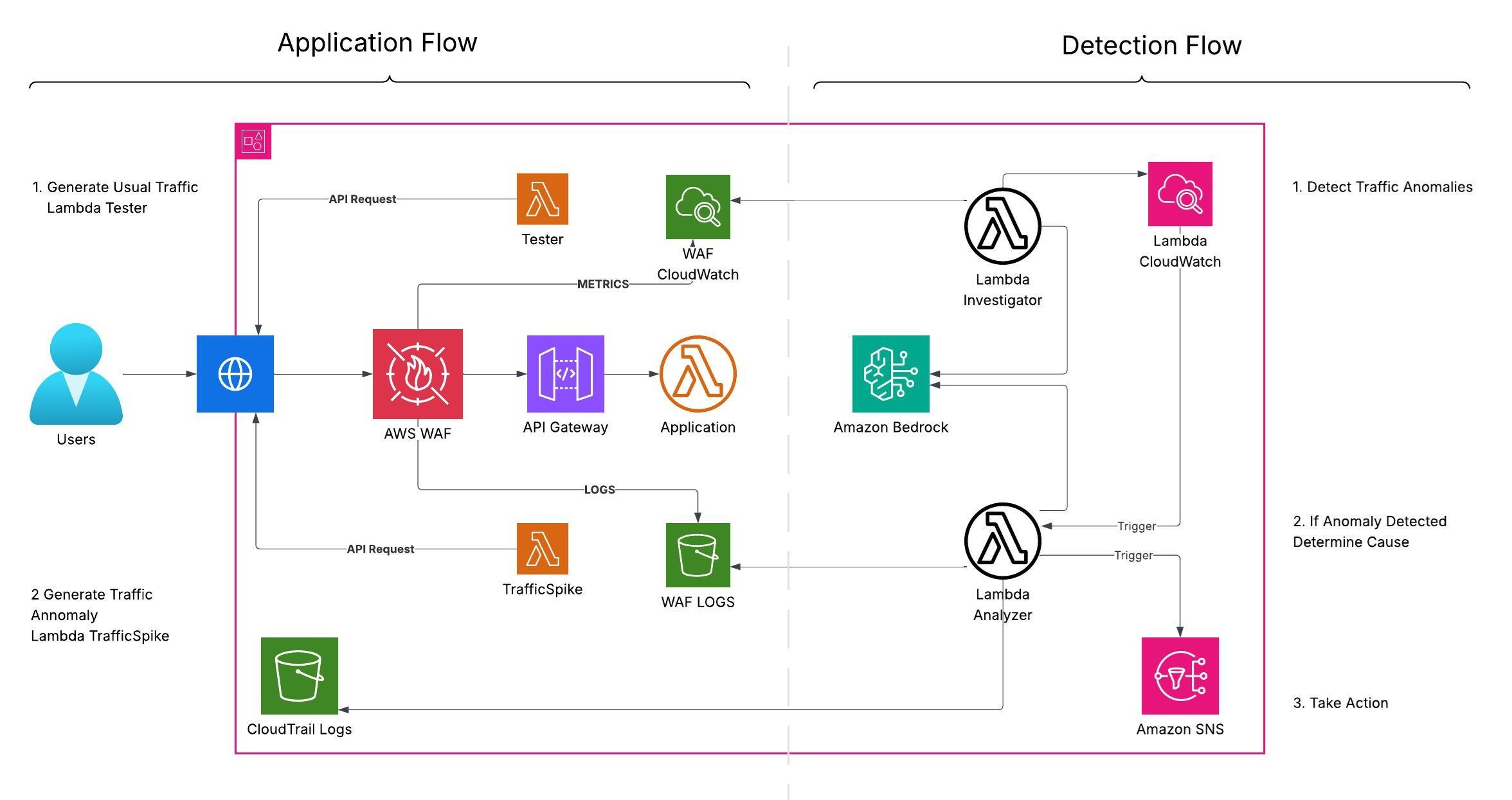
Component breakdown:
Compute
• Lambda Investigator — runs on a schedule (Amazon EventBridge) or manually. It reads AWS WAF metrics from CloudWatch (AWS/WAFV2), detects unusual patterns, and submits a structured prompt to a Bedrock foundation model for anomaly classification and confidence scoring. If confidence exceeds a threshold, it invokes Lambda Analyzer.
• Lambda Analyzer — performs deeper analysis using WAF request logs (Amazon S3), AWS CloudTrail events (recent changes), and WAF configuration (AWS WAFv2). It submits rich context to a Bedrock model, normalizes the output (JSON), and publishes findings to Amazon SNS (email subscription).
Data sources
• Metrics — CloudWatch namespace AWS/WAFV2 (e.g., AllowedRequests, BlockedRequests).
• Logs — WAF request logs in Amazon S3 (via Amazon Kinesis Data Firehose); optionally CloudWatch Logs if you collect app/API logs.
• Changes — AWS CloudTrail LookupEvents for recent configuration or permission changes (e.g., UpdateWebACL, AssociateWebACL, UpdateDistribution on CloudFront).
Orchestration
• Amazon EventBridge — schedules Lambda Investigator (for example, rate(5 minutes)).
• Lambda-to-Lambda — Investigator invokes Analyzer when anomaly confidence exceeds a threshold.
• Optional — Use AWS Step Functions for retries, timeouts, and richer state management.
Amazon Bedrock usage
• Runtime — Bedrock Runtime client; enforce strict JSON with a stop token (optionally enable JSON mode if supported).
• Models — configurable via BEDROCK_MODEL_ID (e.g., amazon.nova-pro-v1:0). Keep the temperature at 0.0 for deterministic output.
• Output normalization — Analyzer parses FM output into strict JSON with robust fallbacks and adds a human-readable email summary.
Prompt engineering tips
• Deterministic outputs: temperature 0, low top_p; JSON-only with a stop token like <END_JSON>.
• Keep context small: baseline, current window, and top‑N IPs/rules/URIs (no raw log dumps).
• Evidence-bound: if data is insufficient, return anomaly=false with a clear reason (don’t guess).
• Enforce schema: validate JSON and retry once with the error message if the output is invalid.
You can deploy the Brain using the function code below, or challenge yourself to build it manually.
Lambda-Investigator
I will add code here (Lambda Investigator)
Lambda-Analyzer
I will add code here (Lambda Investigator)
How to set this up ⚙️
Region and model access
Use the same AWS Region as the App.
Ensure Bedrock model access is enabled in that Region for your chosen model(s).
Create two Lambda functions
Lambda Investigator — handles metric collection, baseline comparison, Bedrock evaluation, and confidence gating.
Lambda Analyzer — aggregates logs, configuration, and recent changes for root-cause analysis and reporting, then emails via SNS.
For both functions, increase memory (e.g., ~2048 MB) and set an appropriate timeout (e.g., up to 5 minutes; consider longer read timeout for Nova).
Schedule the Investigator
Create an Amazon EventBridge rule (e.g., rate(5 minutes)) targeting Investigator.
Notifications
Create an Amazon SNS topic and subscribe your admin email; confirm the subscription.
IAM permissions (least privilege)
Investigator needs: cloudwatch:GetMetricStatistics (or GetMetricData), bedrock:InvokeModel, lambda:InvokeFunction (to call Analyzer).
Analyzer needs: s3:ListBucket and s3:GetObject for your WAF logs bucket/prefix; wafv2:ListWebACLs, wafv2:GetWebACL, wafv2:GetLoggingConfiguration; cloudtrail:LookupEvents; bedrock:InvokeModel; sns:Publish.
Environment variables (recommended)
Common: BEDROCK_MODEL_ID, BEDROCK_REGION, USE_BEDROCK_JSON_MODE, FM_STOP_TOKEN (e.g.,
Bedrock runtime client timeouts
For long-running Nova calls, set runtime config (e.g., BEDROCK_READ_TIMEOUT_SECONDS=3600) and connect_timeout appropriately.
WAF scope and region nuance
For CloudFront (scope CLOUDFRONT), use us-east-1 for WAFv2 API; for REGIONAL, use your Web ACL region.
Validation checklist ✅
• EventBridge → Rules → Investigator schedule is ENABLED and firing on cadence.
• CloudWatch Logs → Investigator and Analyzer log groups exist and show recent runs.
• Bedrock → Model access enabled; Analyzer logs show successful inferences (and JSON parsed without fallback).
• S3 → WAF logs arriving at the expected prefix; Analyzer reads objects within the window.
• WAFv2 → Web ACL details fetch succeeds; logging configuration (Firehose → S3) is visible.
• CloudTrail → LookupEvents returns recent WAF/CloudFront changes; significant events summarized.
• SNS → Email subscription confirmed; alerts arrive with severity, confidence, offenders, rules, URIs, and change summaries.
TIP: Costs and guardrails
• Bedrock inference, Lambda, EventBridge, CloudWatch, CloudTrail, SNS, and S3/Firehose incur charges.
• Use S3 lifecycle policies on WAF logs (e.g., 30–90 days).
• Cap S3 listing and bytes (S3_MAX_KEYS, S3_MAX_OBJECTS, S3_MAX_BYTES) to control analyzer cost/latency.
• Keep Bedrock temperature at 0.0; enforce JSON with a stop token (and optionally JSON mode).
• Consider Step Functions for retries and backoff under noisy traffic conditions.
Time for the test!
Test 1: Regular Traffic ℹ️
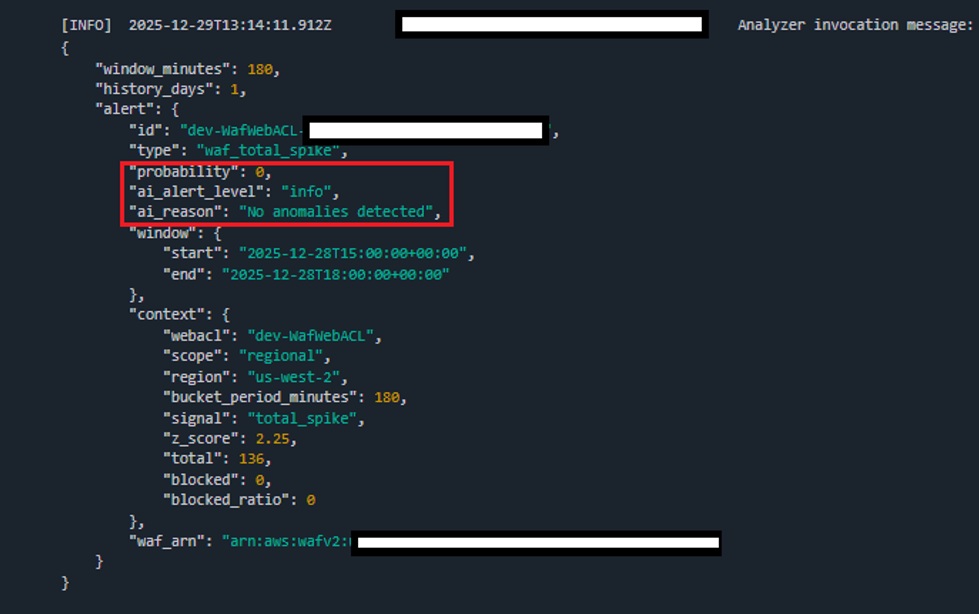
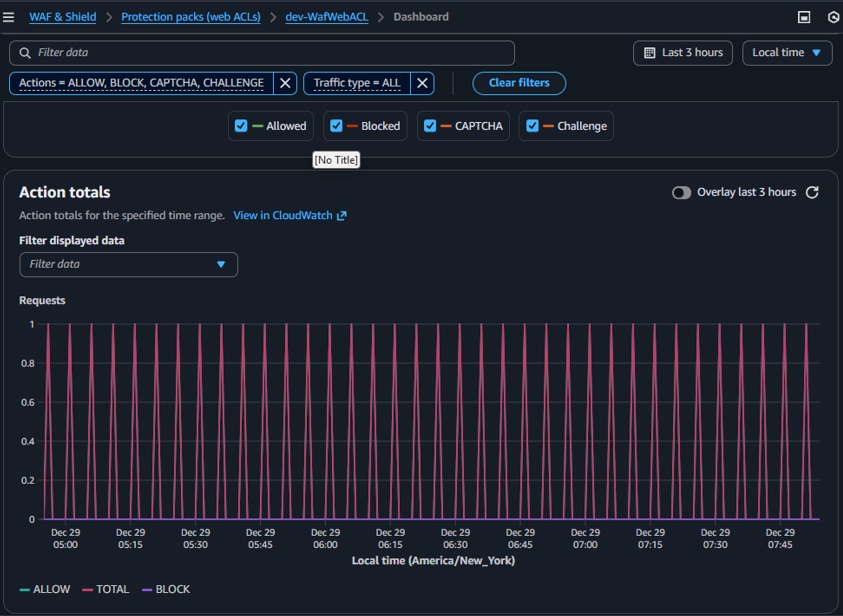
During this test, no unusual traffic was generated. Only the in-app Tester function sent 1 request every 5 minutes.
Result: Lambda-Investigator correctly found no anomalies and did not trigger Lambda-Analyzer.
Test 2: Attack! 🚨
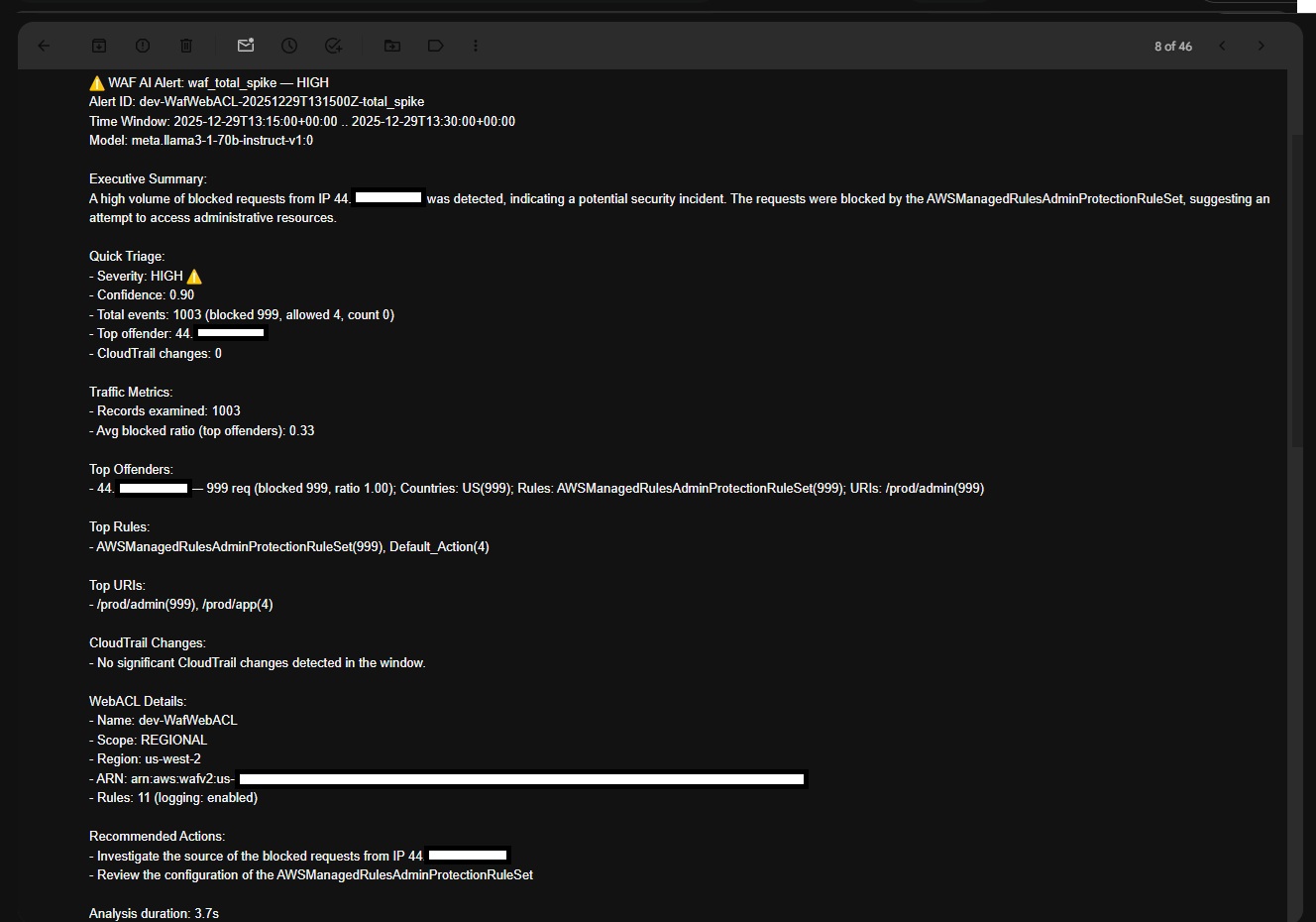
During this test, the Traffic Spike function generated a high volume of malicious requests targeting admin paths.
Result: Lambda-Investigator detected the spike and forwarded context to Lambda-Analyzer. The admin received an email summarizing:
- Executive Summary: Spike of blocked requests from
44.xx.xx.xxtargeting admin paths, blocked byAWSManagedRulesAdminProtectionRuleSet— likely attempted admin access. - Quick Triage: severity, confidence score, number of examined events, top offender, and CloudTrail changes.
- Traffic Metrics: examined records and average WAF block ratio.
- Top Offenders: IP addresses of potential malicious actors.
- Top Rules: WAF rules triggered around detection time.
- WebACL Details: name, scope, region, ARN, number of enabled rules.
- Recommended Actions: investigate the source of blocked requests from the top offender.
(Analysis time: 3.76s ⏱️)
Test 3: Misconfiguration ⚙️
During this test, the Traffic Spike function generated a high volume of requests to a non‑administrative path. Meanwhile, an administrative change was made to WAF to block all US traffic.
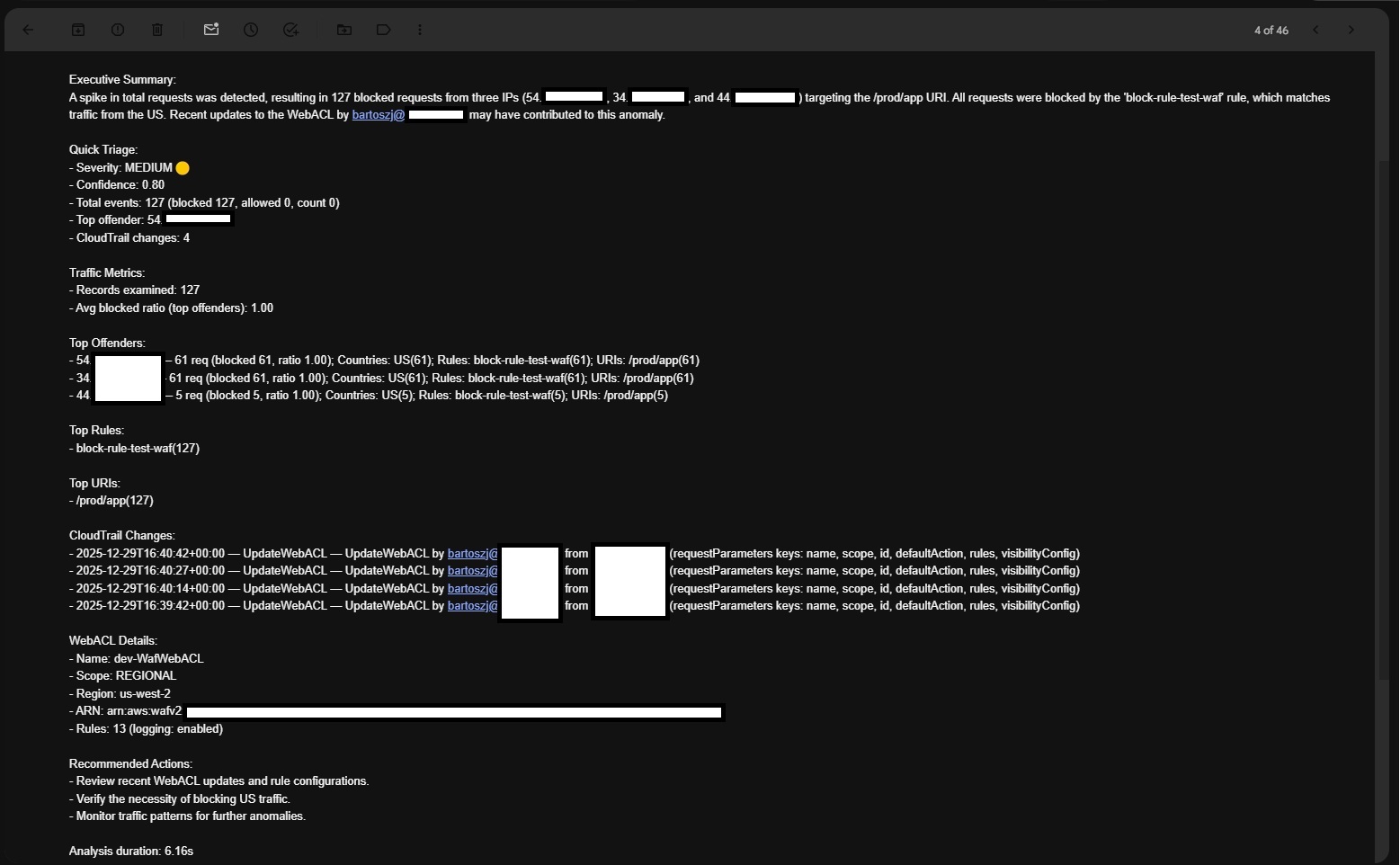
Result: Lambda-Investigator detected the spike and forwarded it to Lambda-Analyzer. The admin received an email summarizing:
- Executive Summary: Spike to
/prod/app: 127 blocks from three IPs (54.xx.xx.xx,34.xx.xx.217,44.xx.xx.xx), all blocked byblock-rule-test-waf(US traffic). Recent WebACL changes bybartoszj@xxxx.commay have contributed. - Quick Triage: severity, confidence score, number of examined events, top offender, and CloudTrail changes.
- Traffic Metrics: examined records and average WAF block ratio.
- Top Offenders: IP addresses with the highest block counts.
- Top Rules: WAF rules triggered around detection time.
- Top URIs: URIs targeted around detection time.
- CloudTrail Changes: relevant events around detection time.
- WebACL Details: scope, region, ARN, number of enabled rules.
- Recommended Actions: review recent WebACL updates and verify whether blocking US traffic is necessary.
(Analysis time: 6.16s ⏱️)
Results, Insights, and Next Steps
We built a simple, end-to-end system: AWS WAF + metrics/logs → Lambda + Amazon Bedrock → email alerts to demonstrate a practical AI use case for security.
While building this system, we validated three scenarios—regular traffic, attack, and misconfiguration—and the system behaved as expected: no alerts for normal baselines, targeted analysis and email summaries for spikes, and clear attribution for configuration changes.
In tests, Bedrock helped spot anomalies, explain likely causes, and significantly reduce investigation time—strengthening cloud security and operational awareness.
This is a proof of concept, not production; it’s meant to inspire and spark creativity. With AI, the possibilities are endless: auto‑triage, guided remediation, policy‑aware playbooks, and lightweight dashboards—these are just a few examples. Don’t stop here—keep exploring and building. When things don’t work at first, troubleshoot and iterate; that’s where the learning happens. We are all early in this AI journey. The most important outcome is the skills and knowledge gained along the way: designing prompts, wiring services, and validating signals.
Next steps: harden IAM, add Step Functions for robust orchestration, expand signals (e.g., AWS Shield, Amazon GuardDuty), apply S3 lifecycle policies for cost control, and keep refining prompts/models based on real telemetry.
And most importantly: stay curious, stay creative, and stay tuned for more deep dives and enhancements.