

Intro
This post lays the foundation for understanding and using Amazon Bedrock’s basic features. We’ll begin with the essentials—what Amazon Bedrock is, how its unified APIs operate (Runtime versus Converse), and how to select models and inference types—then get hands-on with building. You’ll create simple Lambda handlers (both non-streaming and streaming), explore the Bedrock console (Playground plus Model Catalog), and list models programmatically. The aim is to help you deploy quickly, gain confidence, and understand the reasons behind each decision.
Who this is for
If you’re new to Amazon Bedrock and AWS Lambda, this guide quickly takes you from curiosity to deploying your first AI-powered Lambda application. No agents, no RAG, no Knowledge Bases—just the essentials to get something running end-to-end. Every code snippet is ready to deploy with minimal handlers you can use as-is. If you’ve used Bedrock before, consider this a concise refresher to sharpen your workflow.
What you’ll learn
• What Amazon Bedrock is (in plain terms)
• Different inference types and their use cases
• How to choose the right model for your requirements
• The IAM permissions needed to get started
• How to list available Foundation Models (FMs) using Lambda (Python)
• How to call a foundation model from AWS Lambda (Python)
• How to invoke a model using the InvokeModel method and Converse method
• The differences between Streaming (ConverseStream) and Non-Streaming (Converse) interactions
Prerequisites
To follow along with this guide, ensure you have the following:
• AWS account in a region that supports Amazon Bedrock (e.g., us‑east‑1 or us‑west‑2)
• Bedrock model access enabled for at least one chat model you plan to use (e.g., amazon.nova-micro-v1:0)
• Permission to create and deploy AWS Lambda functions (Python runtime)
• A Lambda execution role with the following permissions:
a) bedrock:InvokeModel and bedrock:InvokeModelWithResponseStream
b) bedrock:ListFoundationModels
c) CloudWatch Logs permissions for Lambda logging (logs:CreateLogGroup, logs:CreateLogStream, logs:PutLogEvents)
• Optional: Ability to update the Lambda role/policy yourself to avoid waiting for an admin
• Optional (VPC): If your Lambda runs in a private subnet, set up PrivateLink endpoints for Bedrock and required services, DNS, security groups, and routing
Runtime SDK versions ℹ️
Ensure your environment has boto3 ≥ 1.42.x and botocore ≥ 1.40.x so Bedrock Runtime’s converse and converse_stream are available. On Lambda, check the preinstalled version (e.g., print(boto3.__version__)). If older, ship a Lambda layer or vendor dependencies to include a recent boto3/botocore.
Some AWS services used here might incur minor charges. I suggest reviewing pricing and keeping an eye on your usage.
Recommended IAM policy
The policy below grants permissions to list and invoke models and to write Lambda logs. Note, these permissions are intentionally broad for learning—restrict them before going to production.
IAM policy for the Lambda execution role
{
  "Version": "2012-10-17",
  "Statement": [
    {
      "Sid": "BedrockModelAccess",
      "Effect": "Allow",
      "Action": [
        "bedrock:ListFoundationModels",
        "bedrock:InvokeModel",
        "bedrock:InvokeModelWithResponseStream"
      ],
      "Resource": "*"
    },
    {
      "Sid": "LambdaBasicLogging",
      "Effect": "Allow",
      "Action": [
        "logs:CreateLogGroup",
        "logs:CreateLogStream",
        "logs:PutLogEvents"
      ],
      "Resource": "*"
    }
  ]
}
For production, please make sure that you:
• Scope Invoke/Converse actions to exact model ARN(s)
• Limit CloudWatch Logs permissions to your function’s log groups
• Grant only the actions your function needs
• Consider KMS encryption, retries/backoff, appropriate timeouts, and concurrency settings
• Use inference profiles and/or provisioned throughput for predictable latency in production
With the groundwork and prerequisites in place, let’s take a quick tour of Amazon Bedrock so you know exactly what you’re building with.
What is Amazon Bedrock?
Amazon Bedrock is a fully managed AWS service for building, testing, and deploying generative AI applications—no GPU management or model hosting required. It provides a unified way to access high-quality foundation models (FMs) like Anthropic Claude, Amazon Nova/Titan, Meta Llama, and Mistral through Bedrock Runtime and the Bedrock Converse API. No GPUs or model hosting is needed.
Key capabilities at a glance:
• Unified APIs: Use Bedrock Runtime for direct model invocation and Converse for chat, multi-turn conversations, streaming, and tool responses
• Model catalog: Discover and enable access to models by region; availability varies and updates frequently
• Safety and controls: Guardrails, content filters, PII redaction, jailbreak/unsafe prompt detection; encrypted during transit and at rest
• Enterprise integration: IAM, VPC endpoints (PrivateLink), CloudWatch Logs, KMS, and private networking for controlled access
• Production operations: Inference profiles, provisioned throughput, quotas/limits visibility, logging, and metrics to ensure reliability
• Test (Playgrounds): quick trials, side-by-side comparisons, prompt iteration, guardrail checks
• Infer: batch inference, streaming responses, provisioned throughput, inference profiles
• Tune (Custom models): fine-tune supported models, manage versions/evaluations, deploy tuned variants
• Build: agents and flows, Knowledge Bases (RAG) with citations, reasoning capabilities, centralized guardrails
Data Privacy Basics
• Your prompts and outputs are not used to train the base foundation models.
• Data is encrypted in transit and at rest; you control access via IAM and VPC.
• Some features (e.g., fine‑tuning) store artifacts you manage—review service docs before enabling.
Beginner Tip - Choose The Right API
• Use Converse for most chat models (e.g., amazon.nova‑micro‑v1:0) and streaming.
• Use Runtime for direct text/image/audio model calls that expect provider‑specific payloads.
Helpful references ℹ️
• Model Catalog (us-east-1): AWS Console
• Model parameters (Claude): Docs
• Runtime/Converse examples: Bedrock Runtime examples
Choosing the Right Model and Inference Type
Choosing the right model and inference type affects latency, cost, scale, and regional availability—so it’s worth making a quick plan before you ship.
Inference Types
Let’s start by understanding what inference is. Inference is the act of asking an AI model for an answer: you send a prompt, and you get a result back (text, JSON, images, etc.). The “type” describes how that answer is served—on shared serverless capacity or on reserved, dedicated capacity—which affects your latency, cost, and scalability.
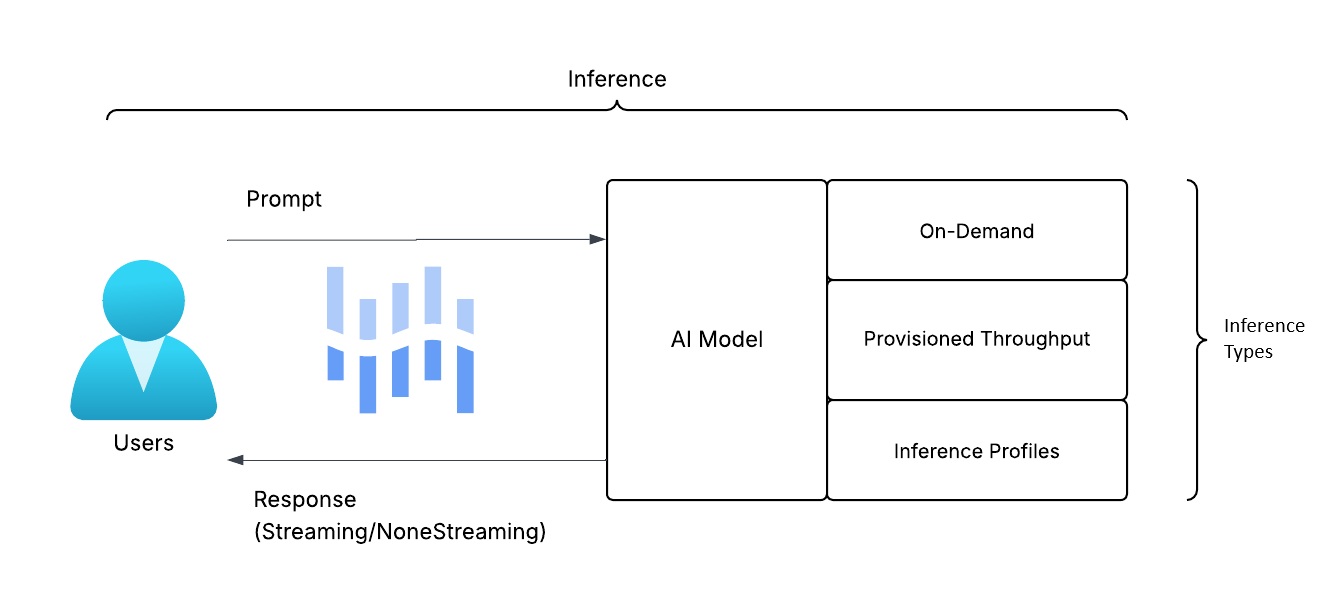
On-Demand (Serverless, Model ID)
• Invoke directly with a model ID (e.g., amazon.nova-micro-v1:0) via Bedrock Runtime or Converse
• Pay per token; zero capacity setup—ideal for tutorials and low-volume features
• Availability and throttling vary by region and model; check quotas
Provisioned Throughput (Dedicated Capacity)
• Reserve capacity for a specific model; billed hourly
• Offers predictable latency and higher throughput—ideal for production SLOs
• Usually backed by an inference profile; you’ll reference its ARN
Inference Profiles (Stable ARN)
• An addressable ARN you call instead of a model ID
• Can route to on-demand or your provisioned throughput behind the scenes
• Decouples code from model/version changes and simplifies IAM scoping
Streaming vs Non‑Streaming
Once you submit a prompt to an AI model, the response can be delivered in two modes: streaming returns tokens as they’re generated, while non‑streaming delivers the full result at once for simpler handling.
Non‑streaming
•Returns the full response when complete; simplest to implement
•Slightly higher perceived latency (user waits for the entire output)
Streaming
• Sends tokens/chunks as they’re generated for faster “time‑to‑first‑byte.”
• Better UX for chat; more code complexity (iterate chunks, flush to client)
Which one to choose?
• Backend jobs, CLI/scripts, short answers, or buffered endpoints (e.g., API Gateway) → Non‑streaming for simplicity and predictable responses
• Interactive chat UIs, assistants, or long/incremental outputs → Streaming for faster first‑token and better UX
Quick Picks ℹ️
• Start with On-Demand (modelId) for tutorials and the initial Lambda integration
• Need guaranteed latency or is On-Demand unavailable in your region? Use Provisioned Throughput with an Inference Profile
• Prefer a stable “endpoint” you can swap without changing your code? Use an Inference Profile
• Scope IAM to the exact model ARN or inferenceProfileArn you invoke
• API options: Chat → Converse/ConverseStream. Direct invoke → Runtime (InvokeModel / InvokeModelWithResponseStream). Some APIs support inferenceProfileArn directly
Recommendations ℹ️
• Start small: On-Demand is cost-effective and zero-ops
• Scale up: Switch to Provisioned Throughput for consistent latency and throughput
• Use Inference Profiles: Maintain a stable ARN and change models or capacity without modifying code
• Monitor and optimize: Track latency, tokens, throttles, and errors in CloudWatch
• Stay informed: Visit the Model Catalog for regional availability and request model access
ConverseStream vs Converse
Now that you have a solid understanding of inference and its types, the next step is understanding how your application talks to the models—Bedrock’s Converse (and ConverseStream) is the go‑to API for programmatic interactions with AWS Bedrock models.
Bedrock’s Converse API offers a unified request format across providers (Anthropic Claude, Amazon Nova/Titan, Meta Llama, Mistral). You select between two response modes based on your UX and performance needs.
Converse (Non-Streaming):
• Single request → returns the full response when complete
• Simplest to implement; best for short outputs, background tasks, or service‑to‑service calls
• Higher perceived latency because the user waits for the entire response
ConverseStream (Streaming):
• Sends tokens/chunks as they’re generated for faster time‑to‑first‑byte
• Ideal for chat UIs and long responses; supports early stop/cancel patterns
• Slightly more complex: you consume a stream of events and assemble the output
Which one to choose?
Prefer Converse when:
• You send short prompts and expect short answers.
• The caller is another service (not a human) or latency isn’t critical.
Prefer ConverseStream when:
• You’re building a chat UI or long responses.
• You want early stop/cancel and “type‑as‑you‑think” UX.
What requests look like (conceptually)
Both APIs accept:
• Messages: a list of turns with roles like user, system, or assistant, and provider-agnostic content blocks (e.g., text)
• Optional system instructions to guide behavior
• InferenceConfig for generation parameters (e.g., maxTokens, temperature, topP)
• Optional safety or guardrail configuration if enabled
Common parameters to know
• MaxTokens: upper limit on generated tokens (prevents runaway responses)
• Temperature/topP: balance between creativity and predictability; lower values lead to more focused output
• StopSequences: strings that, if generated, stop the response (useful for delimiting)
• Tool use/functions: advanced—skip for basics; you can add later
Up next: hands‑on and code snippets! We’ll implement both a minimal non‑streaming handler and a streaming handler in Lambda, including basic error handling, sensible defaults (maxTokens, temperature), and tips for sending live tokens to clients.
Are You Ready to Put Your Knowledge to Work? Let’s Get Started!
First, let’s explore the Model Catalog (Discover -> Model catalog).
Open Amazon Bedrock → Discover → Model Catalog to see available models in your Region.
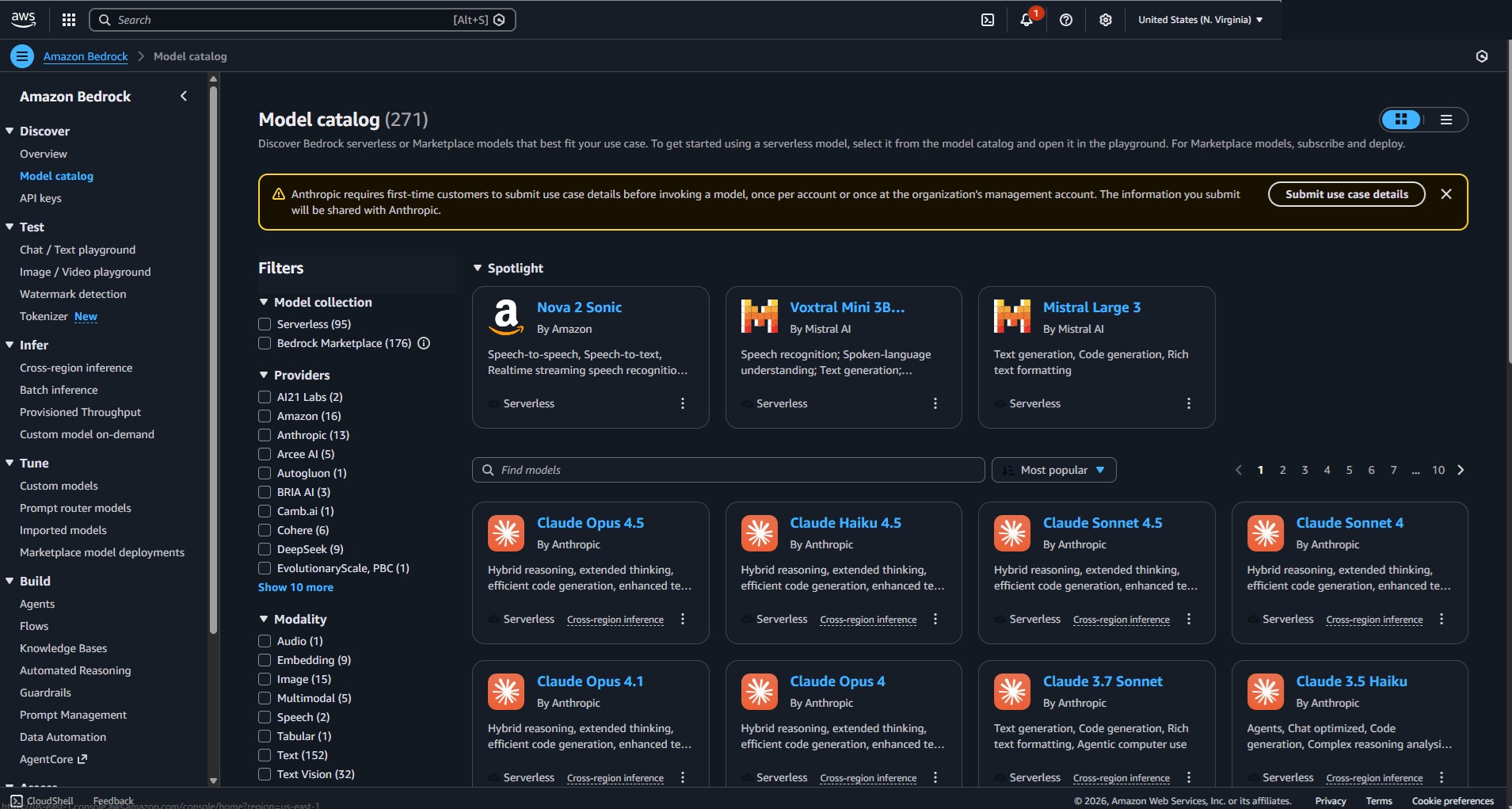
See the Model Catalog (us-east-1): AWS Console » Bedrock Model Catalog
Please note, the model availability changes frequently and varies by Region.
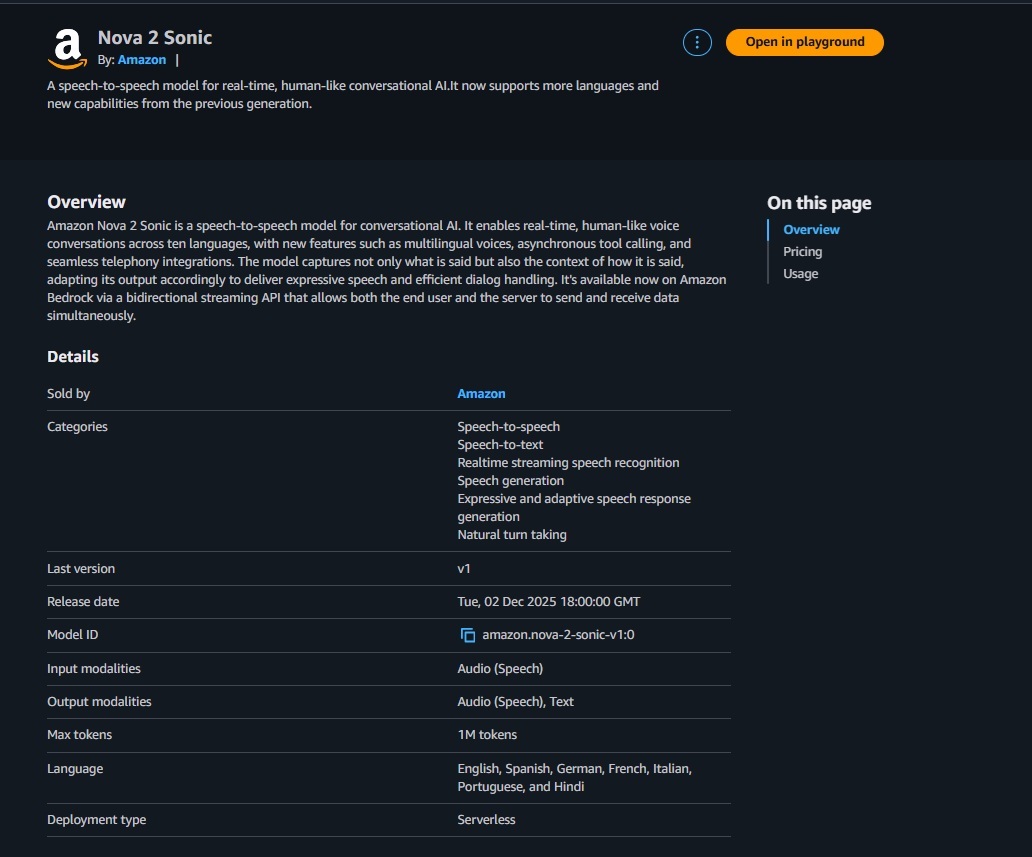
After you select a model, the console links to provider‑specific docs (parameters, limits, examples).
Helpful references ℹ️
• Model parameters (Claude): AWS Docs
• Runtime/Converse examples: Bedrock Runtime examples
Next, try the Playgrounds (Test → Chat)
Go to Playgrounds → Chat → pick a model (e.g., Nova Micro or gpt-oss-20b), write a prompt, and click Run.
Add a short system prompt to set tone/boundaries, for example: “You are a helpful assistant.”
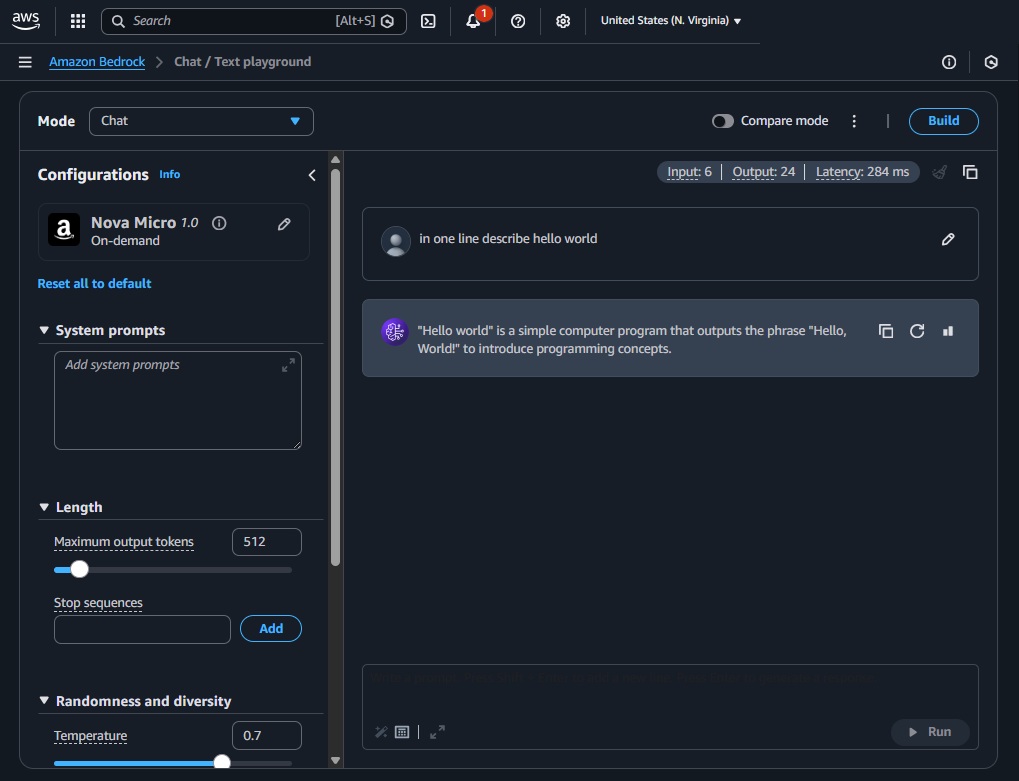
Experiment with parameters and learn by practicing:
• Max tokens (maxTokens): caps output length
• Temperature: lower = more deterministic; higher = more creative
• Top‑p (nucleus): controls sampling diversity
• Stream toggle: compare streaming vs non‑streamed responses side‑by‑side
• Compare mode: run the same prompt across multiple models
• (Optional) Test Guardrails and Prompt Caching
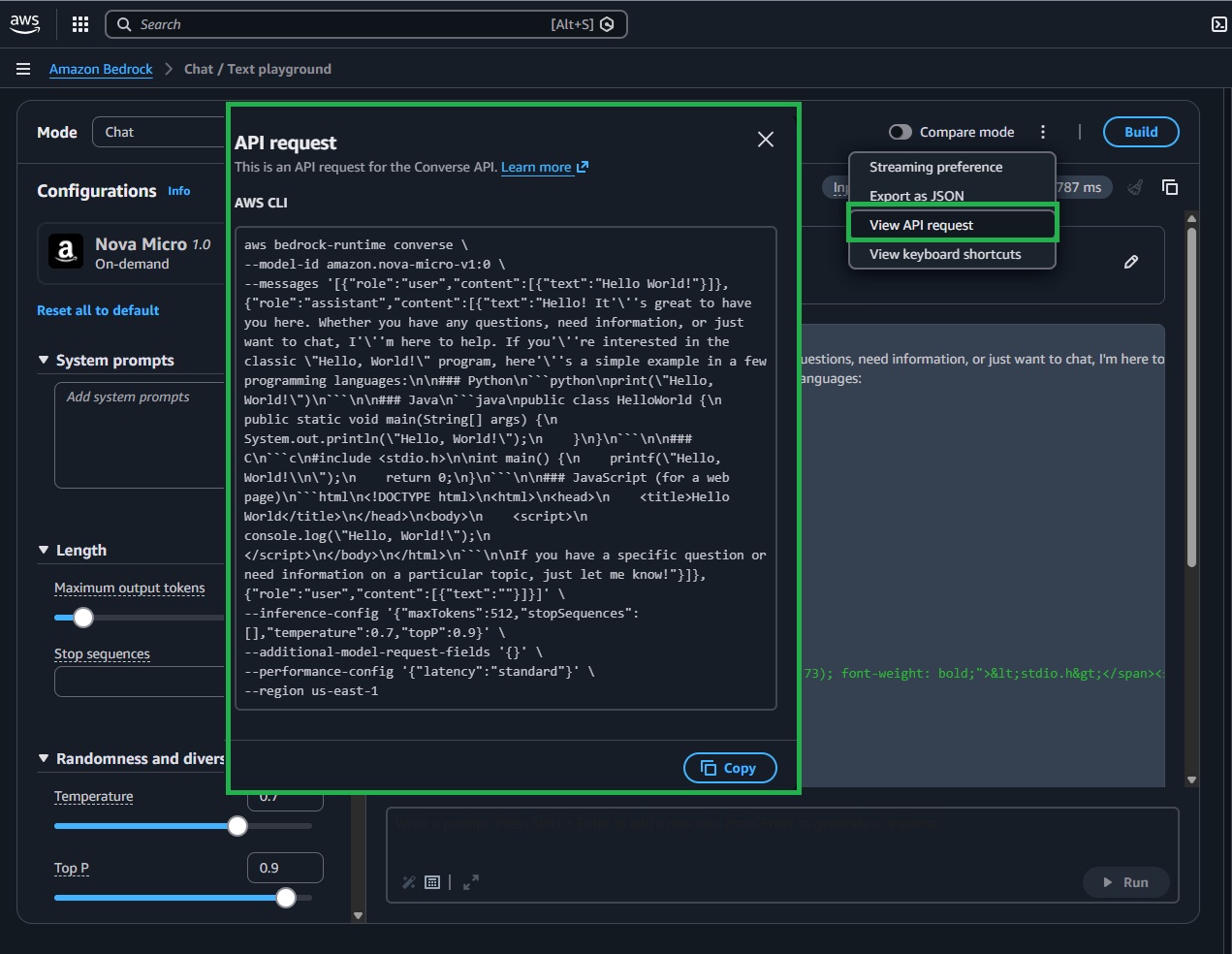
Pro tip: Use “View API request” to copy a ready‑made payload/snippet and align your Lambda parameters.
I hope you’ve taken some time to explore the console and begin understanding the power of AWS AI services. In the next section, we’ll cover the essentials of programmatically interacting with Amazon Bedrock: calling a chat model from your own Lambda function, streaming results, and using a straightforward system prompt. Master these fundamentals, and you’ll have a strong foundation for GenAI on AWS.
List Available Models Using Lambda Function
Let’s start by listing available models in Bedrock from a Lambda function. Create a Lambda using Python 3.13 (to match the code samples below). Don’t forget to attach the IAM permissions you set earlier (e.g., bedrock:ListFoundationModels and CloudWatch Logs). For model invocations, consider increasing the function timeout to around 60 seconds to avoid timeouts; listing models is typically fast.
The snippets below assume us-east-1. Use a Bedrock-supported region where your chosen model is available and enabled.
Lambda Function Code: list Amazon Bedrock foundation models
import os
import boto3

REGION = os.getenv("AWS_REGION", "us-east-1")
bedrock = boto3.client("bedrock", region_name=REGION)

def lambda_handler(event, context):
    """
    Lambda handler that lists foundation models available in the Region.
    Returns a simple list of {modelId, providerName}.
    """
    resp = bedrock.list_foundation_models()
    models = [
        {"modelId": m["modelId"], "providerName": m.get("providerName")}
        for m in resp.get("modelSummaries", [])
    ]
    return {"models": models}
Make a First Call To a Chat Model
Let’s make our first programmatic call to a chat model. We’ll use Bedrock’s Converse API to prompt the on‑demand Amazon Nova model amazon.nova-micro-v1:0. Before you run it, ensure model access is enabled in your region and your Lambda role allows bedrock:InvokeModel. I also recommend reviewing the model card in the console to understand capabilities, limits, and pricing. We’ll start with a simple system prompt and a user message, then read back the assistant’s reply.
AWS Console » Nova Micro model card (us-east-1)
To try a different model, set model_id to another available model ID in your region. You can find model IDs in the Bedrock Model Catalog or from the output of your previous Lambda. Experiment with different prompts via the Lambda event to see various responses.
You can add a system message (role: ‘system’) to steer tone, style, and boundaries (e.g., “You are a concise, helpful assistant. Refuse unsafe requests.”). System messages are part of the Converse API’s messages array and help shape the model’s behavior across turns (check Lambda Function Code: basic invoke v2 ).
Lambda Function Code: Basic Invoke
# Use the Conversation API to send a text message to Amazon Nova (Lambda).
# https://docs.aws.amazon.com/bedrock/latest/userguide/bedrock-runtime_example_bedrock-runtime_Converse_AmazonNovaText_section.html
# https://docs.aws.amazon.com/pdfs/nova/latest/nova2-userguide/nova2-ug.pdf

import boto3
from botocore.exceptions import ClientError

# Create a Bedrock Runtime client in the AWS Region you want to use.
client = boto3.client("bedrock-runtime", region_name="us-east-1")

# Set the model ID, e.g., Amazon Nova Micro.
model_id = "amazon.nova-micro-v1:0"

def lambda_handler(event, context):
    user_message = "Describe the purpose of a 'hello world' program in one line."
    conversation = [
        {
            "role": "user",
            "content": [{"text": user_message}],
        }
    ]

    try:
        # Send the message to the model, using a basic inference configuration.
        response = client.converse(
            modelId=model_id,
            messages=conversation,
            inferenceConfig={"maxTokens": 256, "temperature": 0.2, "topP": 0.9},
        )

        # Extract the first text block from the response.
        content = response["output"]["message"]["content"]
        response_text = next((c["text"] for c in content if "text" in c), "")

        # For Lambda, return a response rather than exit/print.
        return {
            "statusCode": 200,
            "body": response_text
        }

    except (ClientError, Exception) as e:
        return {
            "statusCode": 500,
            "body": f"ERROR: Can't invoke '{model_id}'. Reason: {e}"
        }
How cool is this?! Let’s expand the script to give you more flexibility to experiment. The version below adds OS and logging for easier configuration and diagnostics. Core parameters (AWS_REGION, MODEL_ID, MAX_TOKENS, TEMPERATURE, TOP_P, LOG_LEVEL) are now controlled by environment variables—adjust them to see how they influence the model’s response.
Pro tip: in production, avoid logging full prompts and outputs to protect sensitive data.
Lambda Function Code: Basic Invoke (v2)
# Use the Converse API to send a text message to Amazon Nova from Lambda.
# Docs: https://docs.aws.amazon.com/bedrock/latest/userguide/bedrock-runtime_example_bedrock-runtime_Converse_AmazonNovaText_section.html

import os, json, logging
import boto3
from botocore.config import Config
from botocore.exceptions import ClientError, BotoCoreError

# Configurable settings via environment variables
REGION = os.getenv("AWS_REGION", "us-east-1")
MODEL_ID = os.getenv("MODEL_ID", "amazon.nova-micro-v1:0")
MAX_TOKENS = int(os.getenv("MAX_TOKENS", "256"))
TEMPERATURE = float(os.getenv("TEMPERATURE", "0.2"))
TOP_P = float(os.getenv("TOP_P", "0.9"))
LOG_LEVEL = os.getenv("LOG_LEVEL", "INFO").upper()

# Basic logger (avoid logging full prompts/responses in production)
log = logging.getLogger()
log.setLevel(LOG_LEVEL)

# Bedrock Runtime client
client = boto3.client(
    "bedrock-runtime",
    region_name=REGION,
    config=Config(retries={"max_attempts": 3, "mode": "standard"}, read_timeout=30),
)

def lambda_handler(event, context):
    # Allow overrides from the event payload
    prompt = (event or {}).get("prompt", "Describe the purpose of a 'hello world' program in one line.")
    system_text = (event or {}).get("system", "You are a helpful assistant.")
    model_id = (event or {}).get("modelId", MODEL_ID)

    messages = [{"role": "user", "content": [{"text": prompt}]}]
    system = [{"text": system_text}]

    try:
        log.info("Invoking model=%s (region=%s), prompt_len=%d", model_id, REGION, len(prompt))
        response = client.converse(
            modelId=model_id,
            messages=messages,
            system=system,
            inferenceConfig={"maxTokens": MAX_TOKENS, "temperature": TEMPERATURE, "topP": TOP_P},
        )

        content = response["output"]["message"]["content"]
        response_text = next((c.get("text", "") for c in content if "text" in c), "")

        return {
            "statusCode": 200,
            "headers": {"Content-Type": "application/json"},
            "body": json.dumps({"reply": response_text}),
        }

    except (ClientError, BotoCoreError) as e:
        log.error("Bedrock invoke failed: %s", e, exc_info=True)
        return {
            "statusCode": 502,
            "headers": {"Content-Type": "application/json"},
            "body": json.dumps({"error": "Model invocation failed", "detail": str(e)}),
        }
    except Exception as e:
        log.error("Unhandled error: %s", e, exc_info=True)
        return {"statusCode": 500, "headers": {"Content-Type": "application/json"}, "body": json.dumps({"error": "Internal error"})}
Troubleshooting - Quick Hints
- Access Denied: Enable model access in the Bedrock console and make sure IAM allows bedrock:InvokeModel (or bedrock:Converse for the Converse API).
- Model not found: You might be in the wrong region or using a model ID that isn’t enabled.
- Throttling: Use backoff and retries; keep request payloads small during testing.
- Empty results or Access Denied Exception: Verify the region, model access, and IAM permissions.
- Lambda timeouts: Increase the function timeout for streaming or large outputs.
- Outdated boto3/botocore: Ship a Lambda layer with recent versions so the Bedrock runtime and Converse APIs are available.
- “Malformed input request”: The model might expect a different structure or fields—double-check the model docs and ensure you’re using Converse-compatible parameters.
- On-demand not supported: If a model (e.g., amazon.nova-2-lite-v1:0 in some regions) isn’t available on-demand, use an inference profile, provisioned throughput, or switch to a supported variant (Nova Micro/Sonic) in the same region. Confirm in the Bedrock Catalog and Model access page.
- IAM: Ensure your Lambda role allows bedrock:InvokeModel or bedrock:Converse (optionally scoped to the model ARN) and has CloudWatch Logs permissions.
If you receive a response for at least 2 models—great job! 🎉 If not, try again. You can ask an AI chatbot for help or leave a comment below, and we’ll troubleshoot together.
Non-Streaming Function VS Streaming Function Using Lambda
When integrating an LLM into your app, the key UX choice is whether to return the entire answer at once or stream tokens as they’re generated. Here’s a practical comparison to guide you.
• Non‑streaming (Converse): simplest, returns the full answer at once—best for short replies or service‑to‑service calls
• Streaming (ConverseStream): sends incremental tokens—best for chat UIs and long responses, slightly more code
Non-Streaming Lambda Function
In this example, we’ll create a Lambda that invokes a model in non‑streaming mode and returns the complete response in one go—simple, predictable, and perfect for shorter replies and API‑to‑API workflows. Use the snippet below to test it with your setup.
Lambda Function Code (Non-Streaming example)
# Minimal Lambda handler that calls Bedrock's Converse API (non-streaming).
# Returns the full response once generation is complete.

import os, json, boto3
from botocore.exceptions import ClientError

# Read AWS Region and default model from environment variables.
# Tip: set these in your Lambda configuration.
REGION = os.getenv("AWS_REGION", "us-east-1")
MODEL_ID = os.getenv("MODEL_ID", "amazon.nova-lite-v1:0")

# Create the Bedrock Runtime client (used for both Converse and InvokeModel APIs).
br = boto3.client("bedrock-runtime", region_name=REGION)

def lambda_handler(event, context):
    # Read prompt/system overrides from the event payload (if provided).
    # This lets you test different inputs without redeploying the function.
    prompt = (event or {}).get("prompt", "Describe the purpose of a 'hello world' program in one line.")
    system_text = (event or {}).get("system", "You are a helpful assistant.")

    try:
        # Compose a single-turn conversation: one user message.
        messages = [{"role": "user", "content": [{"text": prompt}]}]

        # System instructions shape overall behavior across turns (top-level in Converse).
        system = [{"text": system_text}]

        # Invoke the model and wait for the entire response (non-streaming).
        # inferenceConfig controls generation length and creativity.
        res = br.converse(
            modelId=MODEL_ID,
            messages=messages,
            system=system,
            inferenceConfig={"maxTokens": 512, "temperature": 0.5, "topP": 0.9},
        )

        # Bedrock returns a unified message format.
        # We extract the first text block from the assistant's message content.
        content_blocks = res["output"]["message"]["content"]
        reply = next((b.get("text", "") for b in content_blocks if "text" in b), "")

        # Return a JSON response that plays well with API Gateway/Function URLs.
        return {
            "statusCode": 200,
            "headers": {"Content-Type": "application/json"},
            "body": json.dumps({"reply": reply}),
        }

    except (ClientError, Exception) as e:
        # Convert errors to an HTTP response (avoid printing sensitive data).
        return {
            "statusCode": 500,
            "headers": {"Content-Type": "application/json"},
            "body": json.dumps({"error": str(e)}),
        }
Streaming Lambda Function
Now let’s switch to streaming. This Lambda uses Bedrock’s ConverseStream to emit tokens as they’re generated, printing each chunk to CloudWatch Logs with clear “start/end” markers and event indices for easy debugging. It also captures the model’s stopReason and concatenates all chunks into a single reply for the HTTP response. Configure behavior via environment variables (AWS_REGION, MODEL_ID, MAX_TOKENS, TEMPERATURE, TOP_P, READ_TIMEOUT_SEC, LOG_LEVEL)—keep READ_TIMEOUT_SEC below your Lambda timeout to avoid disconnects. For true live UX, forward these chunks to clients (e.g., API Gateway WebSockets or Lambda Response Streaming).
Lambda Function Code (Streaming example)
# lambda_function.py
# Lambda handler that uses Bedrock ConverseStream to stream tokens in real time.
# - Prints each chunk on its own line (with an index) to CloudWatch Logs
# - Shows start/stop markers for clarity
# - Returns the full concatenated reply in the HTTP response

import os
import json
import logging
import boto3
from botocore.config import Config
from botocore.exceptions import ClientError, BotoCoreError

# Config via env vars (set these in Lambda → Configuration → Environment variables)
REGION = os.getenv("AWS_REGION", "us-east-1")
MODEL_ID = os.getenv("MODEL_ID", "amazon.nova-lite-v1:0")
MAX_TOKENS = int(os.getenv("MAX_TOKENS", "512"))
TEMPERATURE = float(os.getenv("TEMPERATURE", "0.5"))
TOP_P = float(os.getenv("TOP_P", "0.9"))
READ_TIMEOUT_SEC = int(os.getenv("READ_TIMEOUT_SEC", "55"))  # keep < your Lambda timeout
LOG_LEVEL = os.getenv("LOG_LEVEL", "INFO").upper()

log = logging.getLogger()
log.setLevel(LOG_LEVEL)

# Create Bedrock Runtime client (Nova generations can run longer → increase read_timeout)
br = boto3.client(
    "bedrock-runtime",
    region_name=REGION,
    config=Config(
        read_timeout=READ_TIMEOUT_SEC,
        retries={"mode": "standard", "max_attempts": 3},
    ),
)

def lambda_handler(event, context):
    """
    Stream a response from Bedrock using ConverseStream.
    - Prints each chunk on its own line to CloudWatch Logs for readability
    - Returns the full text at the end as JSON
    """
    prompt = (event or {}).get("prompt", "Describe the solar system in detail.")
    system_text = (event or {}).get("system", "You are a concise, helpful assistant. Refuse unsafe requests.")

    # Request payload shared by Converse/ConverseStream
    messages = [{"role": "user", "content": [{"text": prompt}]}]
    system = [{"text": system_text}]

    try:
        log.info("Streaming invoke model=%s in %s", MODEL_ID, REGION)

        resp = br.converse_stream(
            modelId=MODEL_ID,
            messages=messages,
            system=system,
            inferenceConfig={"maxTokens": MAX_TOKENS, "temperature": TEMPERATURE, "topP": TOP_P},
        )

        # Current response shape ("output.stream"); fall back to older ("stream")
        stream_events = resp.get("output", {}).get("stream") or resp.get("stream", [])

        chunks = []
        stop_reason = None

        # Clear visual markers to make logs easier to scan
        print("=== Streaming start ===", flush=True)

        for idx, evt in enumerate(stream_events, start=1):
            # Optional markers when a message/content block starts
            if "messageStart" in evt:
                print("[event] messageStart", flush=True)
            if "contentBlockStart" in evt:
                cidx = evt["contentBlockStart"].get("contentBlockIndex")
                print(f"[event] contentBlockStart index={cidx}", flush=True)

            # Text arrives as deltas; print each on its own line with an index
            if "contentBlockDelta" in evt:
                delta = evt["contentBlockDelta"]["delta"]
                text = delta.get("text")
                if text:
                    chunks.append(text)
                    print(f"[chunk {idx}] {text}", flush=True)

            # Optional markers when a content block/message ends
            if "contentBlockStop" in evt:
                cidx = evt["contentBlockStop"].get("contentBlockIndex")
                print(f"[event] contentBlockStop index={cidx}", flush=True)
            if "messageStop" in evt:
                stop_reason = evt["messageStop"].get("stopReason")
                print(f"[event] messageStop stopReason={stop_reason}", flush=True)

        print("=== Streaming end ===", flush=True)

        reply = "".join(chunks)

        return {
            "statusCode": 200,
            "headers": {"Content-Type": "application/json"},
            "body": json.dumps({"reply": reply, "modelId": MODEL_ID, "stopReason": stop_reason}),
        }

    except (ClientError, BotoCoreError) as e:
        log.exception("Model invocation failed")
        return {
            "statusCode": 502,
            "headers": {"Content-Type": "application/json"},
            "body": json.dumps({"error": "Model invocation failed", "detail": str(e)}),
        }
    except Exception as e:
        log.exception("Unhandled error")
        return {
            "statusCode": 500,
            "headers": {"Content-Type": "application/json"},
            "body": json.dumps({"error": "Internal error"}),
        }

Notes for Lambda:
• CloudWatch logs: print() goes to CloudWatch; the Lambda console response pane still shows only the final return value
• Timeouts: keep read_timeout below your Lambda timeout (max 15 minutes). For most demos, 30–60 seconds is fine
• System parameter: Converse/ConverseStream use system as a top-level field (not role: “system” inside messages)
Invoke (Bedrock Runtime)
Invoke (Bedrock Runtime) InvokeModel is a direct, stateless interface to a model’s native JSON payload—ideal for one‑shot tasks where you need precise control over provider‑specific parameters. Use InvokeModelWithResponseStream for token-by-token streaming.
How it compares to Converse: both are Bedrock Runtime APIs for communicating with models, but Converse offers a unified chat-style schema (messages/system), built-in tool use, and better portability across providers. Choose Converse for conversational or multi-turn experiences and cross-model consistency; opt for InvokeModel when you require the model’s native request/response format or features not available through Converse.
Not all models support both APIs—some (e.g., embeddings, image/audio) are Invoke‑only; check the model card’s “Supported APIs” for your region
When to use InvokeModel
• Single‑shot text generation, summarization, translation
• Direct calls to image or multimodal models (where supported)
• You prefer provider‑specific payloads for fine‑grained control
• Stateless interactions (you pass all context you need in each request)
Key characteristics
• Native payloads: You send the model’s own JSON schema (varies by provider)
• Non‑streaming and streaming variants: InvokeModel and InvokeModelWithResponseStream
• Works with modelId or inferenceProfileArn
• Same IAM actions as Converse: bedrock:InvokeModel, bedrock:InvokeModelWithResponseStream
Example below invokes Amazon Titan Text Express using Bedrock Runtime’s InvokeModel in a single-shot, non‑streaming call. It sends the model’s native JSON payload (inputText + textGenerationConfig), parses the native response, and returns a compact JSON object containing both the original prompt and the generated output—ideal for quick tasks where you want provider‑specific control.
Lambda Example: InvokeModel (Non‑Streaming)
#https://docs.aws.amazon.com/bedrock/latest/userguide/model-parameters-titan-text.html

import os
import boto3
import json
from botocore.exceptions import ClientError

REGION = os.getenv("AWS_REGION", "us-east-1")
bedrock_runtime = boto3.client("bedrock-runtime", region_name=REGION)

def lambda_handler(event, context):
    """
    Lambda handler that invokes the Amazon Titan Text Express model using the `invoke_model` API.
    """
    model_id = "amazon.titan-text-express-v1"  # Replace with your model ID
    prompt = "Describe the purpose of a 'hello world' program in one line."

    # Format the request payload using the model's native structure.
    native_request = {
        "inputText": prompt,
        "textGenerationConfig": {
            "maxTokenCount": 512,
            "temperature": 0.5,
        },
    }

    # Convert the native request to JSON.
    request = json.dumps(native_request)

    try:
        # Invoke the model with the request.
        response = bedrock_runtime.invoke_model(modelId=model_id, body=request)

        # Decode the response body.
        model_response = json.loads(response["body"].read())

        # Extract and print the response text.
        response_text = model_response["results"][0]["outputText"]

        return {
            "statusCode": 200,
            "body": json.dumps({
                "modelId": model_id,
                "inputText": prompt,
                "outputText": response_text
            })
        }

    except (ClientError, Exception) as e:
        return {
            "statusCode": 500,
            "body": json.dumps({
                "error": f"Can't invoke '{model_id}'. Reason: {str(e)}"
            })
        }
Summary
Congrats—you’ve just taken your first steps into Amazon Bedrock with AWS Lambda! You now have a solid understanding of how Bedrock works, the different inference styles, and how to choose the right model for your use case. You set up the essential IAM permissions, listed available foundation models from Lambda, and invoked models programmatically—both in non-streaming and streaming modes. You also learned how and when to use the InvokeModel API, providing you with a versatile toolkit for integrating generative AI into real applications.
What you accomplished
• Understood Amazon Bedrock’s role and how it unified access to FMs
• Compared non-streaming and streaming interactions and built Lambda functions for both
• Learned how to list available models and select one suitable for your task
• Invoked models using InvokeModel, including tips for reliable outputs
• Gained familiarity with the IAM permissions needed for secure, least-privilege access
Keep Practicing!
Don’t stop here—momentum is key:
• Experiment with different models and prompts (e.g., Amazon Titan for single-shot tasks, Amazon Nova or chat-optimized models for multi-turn interactions)
• Convert a non-streaming Lambda to streaming and measure latency improvements
• Add guardrails, prompt templates, and observability with CloudWatch to make your app production-ready
• Explore the Converse API when you need context across turns, tools, or multimodal inputs
• Track costs and performance: tune maxTokenCount, temperature, and retries/backoff for stability
If you’re ready for the next step, check out my follow-up post: “Reduce MTTD/MTTR with Amazon Bedrock — From Telemetry to Action”
Have a specific topic you want me to cover next (e.g., “Call a stable Inference Profile ARN,” Guardrails, Prompt Caching, VPC endpoints/PrivateLink, or streaming to API Gateway/AppSync)? Drop a comment below and I’ll prioritize a deep dive.